


01 — Project Overview
From a Hand Sketch to a Digital CAD Model
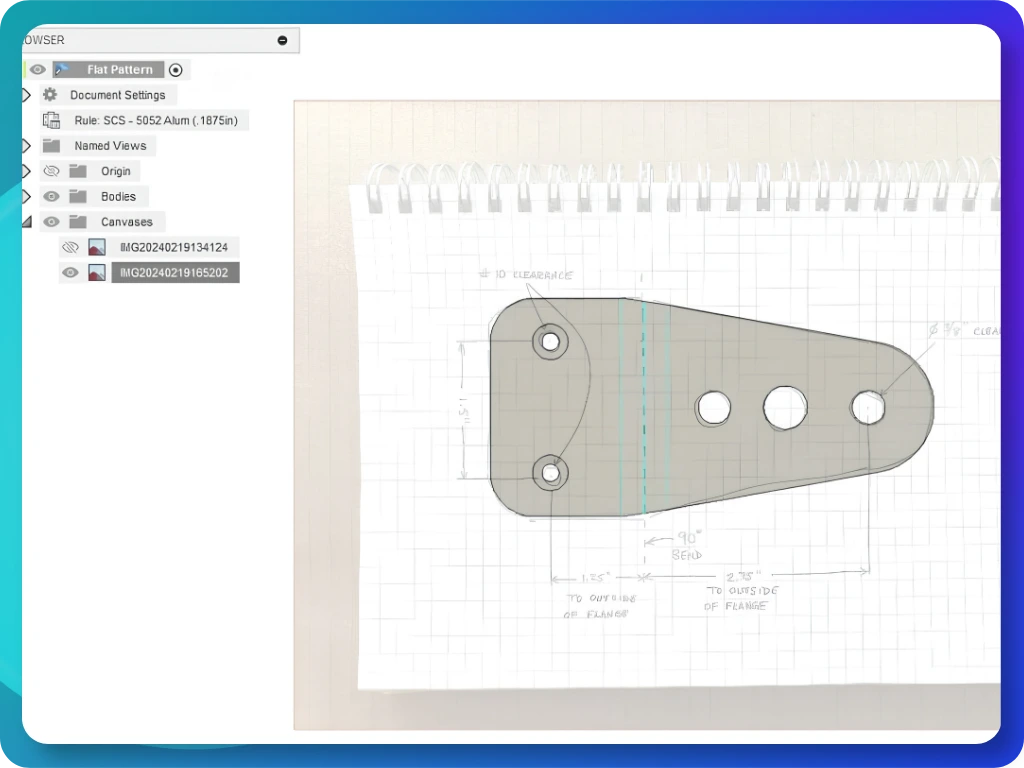
A hand sketch can communicate the shape of a component, but a digital 3D model can make it easier to review geometry, share a design concept, and prepare files for the next stage of a project.
SYNCCAD helps prepare simple 3D CAD models based on your sketches, dimensioned drawings, images, and existing references. We confirm the required geometry and deliverables before work begins.
02 — Use Cases
When Do You Need Sketch to 3D CAD?

Turning a Hand Sketch into CAD
You have sketched a bracket, spacer, or simple mechanical component and need a digital 3D representation.
Discover
Preparing a Product Concept
You need a basic model to communicate an idea to a colleague, supplier, prototype provider, or manufacturing partner.
Discover
Converting a 2D Drawing into 3D
You have a drawing with sufficient dimensions and views and need a corresponding simple 3D model.
Discover
Preparing a Model for the Next Step
You need a digital model to discuss with your chosen manufacturer or prototype provider.
Discover03 — What We Prepare
Simple 3D CAD Models Within a Defined Scope
SYNCCAD can prepare simple CAD geometry from sufficiently clear references, subject to scope review.
Basic mechanical components: simple blocks, brackets, plates, and spacers.
Dimension-based geometry: shapes and features defined by supplied measurements.
Sketch-to-model preparation: simple geometry interpreted from sketches with sufficient detail.
Existing CAD modifications: clearly specified changes where the source file is supported.
Agreed file conversion: conversion between supported formats where the source geometry permits it.
04 — Required References
What to Provide for a Sketch-to-CAD Request
A clear reference
helps establish the intended shape and scope. Please provide as much of the following as possible:
A sketch, drawing, image, or existing CAD file.
Available dimensions and measurement units.
Relevant views, such as front, side, top, or isometric.
Details of important holes, slots, cut-outs, or other features.
Preferred supported output format.
A short explanation of the intended use.
If information is missing:
SYNCCAD may ask for clarification before confirming the job. Do not assume missing dimensions or critical features without customer confirmation.
05 — How It Works
From Reference to CAD Delivery
01 — Send Your Reference
Submit your sketch, drawing, dimensions, image, or existing CAD file.
02 — Confirm the Scope
Confirm the geometry, output format, deliverables, and what is included in the job.
03 — Prepare the CAD
Work starts after scope and payment confirmation and receipt of the required information.
04 — Review & Receive
Receive the agreed files and review them against the confirmed scope.
06 — Deliverables & Scope
Our design features offer a range of tools to create visually stunning websites. Utilize WYSIWYG editors, drag-and-drop building blocks, and Bootstrap-based templates for effortless customization. With professional themes and an intuitive system, you can design with ease and precision, ensuring a polished, responsive result.
Building blocks system
Create pages from scratch by dragging and dropping customizable building blocks. This system simplifies web design, making it accessible to all skill levels. Combine headers, images, and text sections to build cohesive layouts quickly and efficiently.
Bootstrap-Based Templates
Design Odoo templates easily with clean HTML and Bootstrap CSS. These templates offer a responsive, mobile-first design, making them simple to customize and perfect for any web project, from corporate sites to personal blogs.
07 — FAQs
Frequently Asked Questions
Yes, for simple models where the sketch and available dimensions provide enough information to define the geometry, subject to scope confirmation.
You can reach our customer support team by emailing info@yourcompany.example.com, calling +1 555-555-5556, or using the live chat on our website. Our dedicated team is available 24/7 to assist with any inquiries or issues.
We’re committed to providing prompt and effective solutions to ensure your satisfaction.
We offer a 30-day return policy for all products. Items must be in their original condition, unused, and include the receipt or proof of purchase. Refunds are processed within 5-7 business days of receiving the returned it